Valheim server settings generator
Every setting a Valheim 1.0 dedicated server takes on its command line, with world modifiers and presets, checked against the rules Valheim enforces when it starts. Get the command, a start_server.sh for Linux or a start_headless_server.bat for Windows. Start from a preset or from your own script.
Start from your own script
Paste your start_server.sh, .bat or the command you run, or choose the file. It’s read on this device, never uploaded. Arguments this page doesn’t edit are kept.
Quick answers
Do world modifiers apply to an existing Valheim world?
Yes. Valheim applies -preset, -modifier and -setkey every time the server starts and stores them in the world, so they change an existing world from its next start, not only new ones. -preset first resets every modifier, then each -modifier after it overrides one. Without -preset, a -modifier only changes that one value and the world keeps the rest; removing the arguments later doesn’t undo them, so write -preset normal to go back. This generator always writes -preset first, as our panel does.
What are the Valheim server password rules?
Only listed servers (-public 1, the default) have them: the server quits on start when the password is shorter than 5 characters or is contained in the world name or in the world’s seed. The check is case-sensitive, and the server name doesn’t count, whatever older guides say. An unlisted server (-public 0) takes any password, or none. Our panel asks for 5–20 letters, numbers, - or _ either way.
Can I set a seed on a Valheim dedicated server?
Not with an argument: the dedicated server has no -seed, and a new world gets a random seed. To play a seed you picked, create the world in the game (Start game, New world, type the seed), then copy its world folder from worlds_local to the server’s worlds_local folder (inside -savedir) and set -world to its name. On Game Hosting, open the World tab, choose New world and type the seed: the panel writes the world file before the first start, so the server loads your seed.
How many players can join a Valheim server?
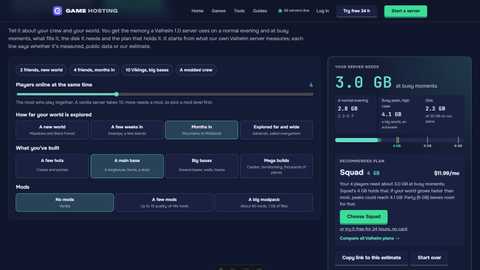
Ten. A vanilla Valheim server refuses an 11th player. More takes a BepInEx mod that raises the limit, and memory grows with what your world holds more than with players. Our server requirements calculator gives the memory for your group.
Which ports does a Valheim server use?
The -port you set and the next one, UDP: 2456 and 2457 by default. Open both in your firewall and router. Two servers on one machine need ports at least two apart. With -crossplay, console players join with the join code instead of the address.
What do -saveinterval and -backups do?
The server saves the world every -saveinterval seconds (1,800, half an hour, by default) and keeps -backups copies of it (4). The first copy is made -backupshort seconds after the server starts (7,200) and then every -backuplong seconds (43,200). Valheim accepts values down to 5 seconds; our panel and this page take at least 300 seconds between saves and 600 before the first copy.
Does it work with BepInEx mods?
Yes. Choose BepInEx under Mod loader. On Linux the script sets the environment BepInEx needs (doorstop) before starting the server; on Windows, BepInExPack_Valheim’s winhttp.dll loads it with the normal .bat. Every player needs the same mods.
More free Valheim tools
Arguments, defaults and rules from the Valheim 1.0 dedicated server. Plans use our server requirements model.