Your Palworld Palbox
Step-by-step guideLoading your Palbox…
Loading your Palbox…
Quick answers
How do I see all my Pals and their passives?
Choose your world folder above, or the whole SaveGames folder and pick the world from the list, or a .zip of either. This save viewer reads every Pal in the world: party, Palbox, bases and Dimensional Pal Storage, with species, nickname, level, sex, condenser stars, passives, IVs, equipped skills, work suitability and who owns it. Search by name or passive, filter by element, job, passive, passive type (base work, boosts you in the party, combat, riding), what a Pal is good for (mining, fishing, bows…), IVs, sex, stars, level, Lucky, Alpha or location, sort by any column, and click a Pal for its full page.
Which Pals should I take for mining, wood, fishing or my bow?
Open “Party builder” and pick what you’re doing: carrying more, a mining or logging run, fishing, base helpers, your damage, your Pals’ damage, staying alive, melee, bows, guns or a status combo like Burn or Soak. It builds the best five-Pal party from your own Pals: one Pal to call out or ride (Digtoise for ore, Anubis to turn your attacks Ground), Pals whose partner skills work from the party (Reptyro or Turtacle for lighter ore, Turtacle Terra for Sulfur and Coal, Cattiva to carry more, Robinquill for bows) and Pals with passives that boost you, like Vanguard or Mine Foreman. It also pairs Pals that work together, such as a Burn builder with a Pal that hits Burning enemies harder, and lists the helpers you don’t have yet with where they spawn. The same partner skill twice doesn’t stack, so it takes one Pal of each.
How do I find fully condensed Pals that still need levels?
Click the “Fully condensed (4★)” tile: it shows your 4-star Pals below level 80, highest level first, so you can put the next one in your party. The level filter (below Lv 80, 70, 60…) works with any other filter too. A Pal’s partner skill level is its condenser stars plus one, shown on its page.
Can I read a dedicated server at a friend’s house from my own PC?
Yes. Open this page on the server computer (over RustDesk, Remote Desktop or in person), choose its world folder (Pal/Saved/SaveGames/0/<world ID>/), then press “Save world file”. That small .json has every player’s Pals and progress; copy it to your PC and choose “Open a Palbox file” there. You can also copy the world folder itself and read it on your PC. Either way, pick a player at the top to see only their Pals, and “Export CSV” saves the list for a spreadsheet.
Where is my Palworld world folder?
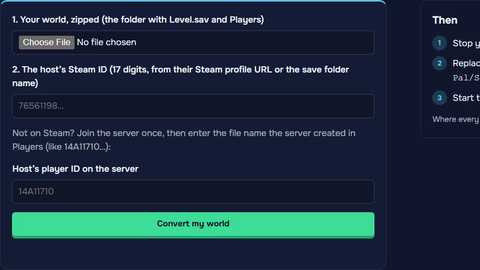
Steam on Windows: %LOCALAPPDATA%\Pal\Saved\SaveGames\<your Steam ID>\<world ID>\, the folder with Level.sav and a Players folder. On a dedicated server it is Pal/Saved/SaveGames/0/<world ID>/. Choose that folder, or the SaveGames folder itself (%LOCALAPPDATA%\Pal\Saved\SaveGames): the viewer lists every world in it, with its name, host and level, in-game day, players and when you last played, and reads only the one you pick. A .zip works too. Xbox and Game Pass saves are stored differently and can’t be read here.
Can it show my Pals’ exact IVs?
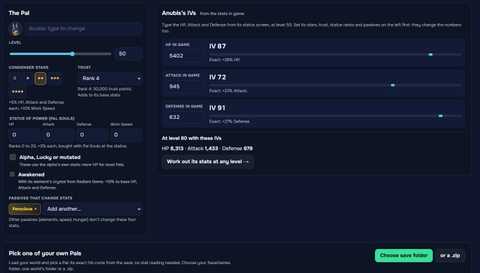
Yes. IVs (the hidden HP, Attack and Defense values from 0 to 100) are stored in the save, so the viewer shows the exact numbers for every Pal, with no level or stat guessing like an IV calculator needs. At 100 an IV adds 30% to that stat. Filter by “IVs 90+” to find the best breeding parents.
Does it show each Pal’s real HP, Attack and Defense?
Yes. Every Pal gets its stats now from its level, IVs, condenser stars, trust, Statue of Power ranks, alpha or Lucky and passives, all read from the save, with the same formula as our IV calculator (checked against the HP the game stores). Sort the list by HP, Attack or Defense from the column header, and open a Pal to see Work Speed too and to try changes in the calculator. Awakening isn’t in what we read, so an awakened Pal has 10% more base than shown.
Which of my Pals have Pal Souls used on them?
The Pal Souls column shows the Statue of Power ranks each Pal has in HP, Attack, Defense and Work Speed, read from the save. Each rank adds 3% to that stat, up to 20 per stat. Click the “Pal Souls used” tile, or tick the filter of that name, to list only those Pals, most ranks first; open one to see its ranks as bars.
Which of my Pals can I ride, and how fast are they?
The Riding column shows how each Pal rides (on land, flying or in water), its speed / sprint speed and its stamina, which is how long it can sprint, fly or dash before it tires. The “Mounts” tile lists your mounts fastest first, and the mount filter picks only flying, land or water mounts. Sort by speed or stamina from the column header; a Pal’s page adds jump and the saddle it needs. Speeds are the game’s own numbers, as on paldb.cc.
What does each Pal drop if I butcher it?
The Drops column shows what each Pal drops at its level, the same items you get by butchering it with a Meat Cleaver, with the amount; its page lists every item with its chance and links to the item database. World Tree Pals drop a different list from level 70 on, and the list shown is the one for your Pal’s level; the page also lists what that species’ alpha boss drops. The drops filter finds which of your Pals give an item, such as Leather or Wool.
What can I breed from the Pals I already have?
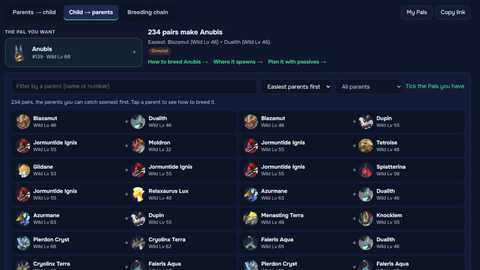
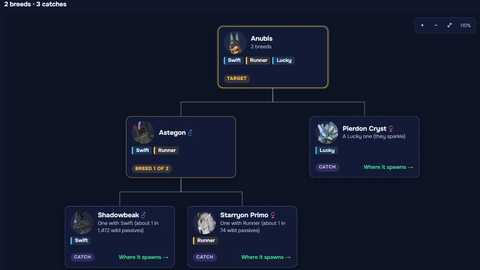
“Breed next” lists every Paldeck species as one you have, one, two or three breeds away, or not yet, with the breeds to do in order. It follows the breeding calculator’s rules: each breed needs a male and a female, and gender combos need the sexes shown. Each step opens the breeding calculator with that pair.
Can it track my 100% progress?
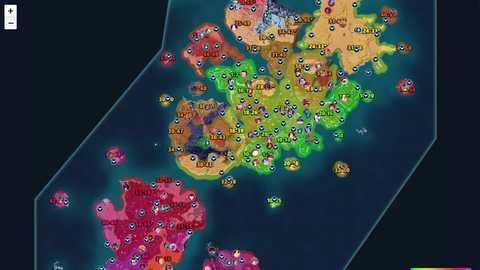
The 100% tracker reads each player’s file: fast travel points, watchtowers, tower bosses, alpha and bounty bosses, journals, ancient ruins, every kind of effigy and the Paldeck, against everything a save can tick. Open the list of what’s missing to jump to each spot on the map, or “Show on the map” to see what you found ticked there. Chests, eggs, ore and plants aren’t in saves, so they aren’t counted.
Can I share my filters?
Yes. Filters (passives, IVs, sex, element, work, stars, location, Pal Souls, mounts, drops…), the view and the sort are in the page address, so a link opens the same list for whoever has their world loaded. Pick several passives to see only Pals with all of them.
Is my save uploaded?
It never leaves your device. Your browser reads the world itself and keeps the list of Pals so the page remembers it next time; “Forget it” deletes it. The breeding path uses the same list, so you don’t pick the folder twice. Saves are decoded with the open-source ooz-wasm (GPL-3.0); its license and source are at gamehosting.app/licenses/ooz-wasm.txt.
Can it edit my save?
No. It only reads, so it can’t break your world. To change a Pal you need a save editor, and you should back up the world folder first.
How many Pals do I need to condense to 4 stars?
In Palworld 1.0 the Pal Essence Condenser takes 4, 8, 12 and 24 more Pals of the same species for stars 1 to 4: 48 in all, plus the one you keep. The Condense view counts your duplicates and shows which of your Pals can gain stars now and how many more you need.
What does “Missing” show?
Every Paldeck species none of your Pals is right now, by number, with where it spawns on the map or how to breed it. It counts the Pals in the world, so a Pal you caught and sold counts as missing.
Can my server do this without picking folders?
Yes. On a Game Hosting Palworld server (from $16.99/mo) the panel reads your world every 10 minutes and its Pals tab shows every player’s Pals with level, passives and IVs, and the Breeding tab plans from them.
More free Palworld tools
Palworld 1.0.5. Saves are read in your browser with ooz-wasm (GPL-3.0-or-later). Pal icons from Palworld, © Pocketpair, Inc. Game Hosting is not affiliated with Pocketpair.