Palworld server settings generator
Step-by-step guideConfigure every one of the 95 gameplay and performance settings of a Palworld 1.0.5 dedicated server, each explained in plain English, and download a ready PalWorldSettings.ini. Start from a preset or from your own file. Settings not applying? Check your file with the settings checker.
Start from your own file
Choose your PalWorldSettings.ini or a world’s WorldOption.sav, or paste the file. It’s read on this device, never uploaded. Ports, RCON and keys this page doesn’t edit are kept as they are.
PalWorldSettings.ini or WorldOption.sav?
A dedicated server: PalWorldSettings.ini. It goes in Pal/Saved/Config/LinuxServer/ (WindowsServer on Windows).
A co-op or single-player world: WorldOption.sav. Those worlds keep their settings inside the world. Close the game, keep a copy of the world’s own WorldOption.sav, and put this one in its place: on Steam, %LOCALAPPDATA%\Pal\Saved\SaveGames\<Steam ID>\<world ID>\.
Best: load your world’s WorldOption.sav first (Start from your own file, above). Your changes then go on top of the world’s own settings. Without it, the file keeps what a co-op world has where this page still shows a server’s default: multiplayer on, up to 4 players, Pal dung on and Global Palbox import on.
The risk: on a server, a WorldOption.sav in the world’s folder overrides PalWorldSettings.ini, so later changes to the .ini stop applying until you remove it. Use it on a server only when the host won’t apply your .ini. The settings checker finds one that’s in the way.
Quick answers
Where does PalWorldSettings.ini go?
On a Linux dedicated server: Pal/Saved/Config/LinuxServer/PalWorldSettings.ini. On Windows: Pal\Saved\Config\WindowsServer\PalWorldSettings.ini. DefaultPalWorldSettings.ini in the main folder is only a template: Palworld never reads it. Stop the server, replace the file, then start it again: Palworld writes its settings back to the file when it stops.
Why don’t my Palworld server settings apply?
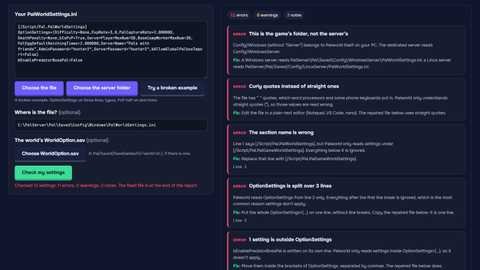
The usual reasons: OptionSettings is split over several lines (Palworld reads only the first), the file is in the wrong folder, a setting name is misspelled, or the world has a WorldOption.sav from co-op, which Palworld obeys instead of PalWorldSettings.ini. Our free settings checker finds each of these and gives you a fixed file. On Game Hosting the panel spots a WorldOption.sav and removes it for you after a backup.
Can I edit the settings I already have?
Yes. Choose your PalWorldSettings.ini (or paste it) under “Start from your own file”. Every setting this page knows is loaded into the form; ports, RCON, the REST API and keys from mods are kept exactly as they were. You can also load a WorldOption.sav to turn a co-op world’s settings into a PalWorldSettings.ini. Files are read in your browser and never uploaded.
What are the best Palworld server settings?
It depends on your group. For friends who play at different times, the Friends preset keeps bases safe while people are away (no inactive-guild wipe, no offline penalty for base Pals) and adds room to build. For a faster game, Chill co-op or Boosted raise EXP, drops and work speed. Keep PalSpawnNumRate and Pals per base near the defaults on busy servers: they cost the most performance.
What’s the difference between MaxBuildingLimitNum and MaxBuildingLimitNumPerPlayer?
MaxBuildingLimitNum came in v0.4.11 as the world setting for the most buildings per base; Palworld 1.0.4 added MaxBuildingLimitNumPerPlayer, a limit on what each player can build across the world. 0 means unlimited for both. Pocketpair’s server guide still describes MaxBuildingLimitNum as per player, so test on your server if the exact limit matters.
How do I turn on PvP?
Switch on “Player vs player”. The file then sets the three flags Pocketpair’s PvP guide asks for: bIsPvP, bEnablePlayerToPlayerDamage and bEnableDefenseOtherGuildPlayer. The Challenge preset adds a full death penalty; PvP kill rewards and map markers are under Combat & PvP.
Does this work for co-op worlds?
Yes, with the WorldOption.sav download. Co-op and single-player worlds keep their settings in the world’s own WorldOption.sav, not in PalWorldSettings.ini. Close the game, keep a copy of the world’s WorldOption.sav, and put ours in its place: on Steam, %LOCALAPPDATA%\Pal\Saved\SaveGames\<Steam ID>\<world ID>\. Moving a co-op world to a server? Load its WorldOption.sav here to keep its rules in a PalWorldSettings.ini.
When should a server use WorldOption.sav?
Almost never. While a WorldOption.sav sits in the server’s world folder (Pal/Saved/SaveGames/0/<world ID>/), Palworld takes every setting from it and ignores PalWorldSettings.ini, so later changes to the .ini stop working. Use it only on a host that won’t apply your .ini, and remove it when you go back to the .ini. Our settings checker spots one that’s in the way.
How long do eggs take to hatch with my settings?
PalEggDefaultHatchingTime is the hours a Huge Egg takes. Large Eggs take half of it and regular Eggs a twelfth, from the game’s egg table (rarity 1–4 Egg, 5–7 Large Egg, 8 and up Huge Egg). A very comfortable incubator halves each time. At 1.0.5’s default of 1 hour: 5 minutes, 30 minutes and 1 hour. The generator shows the times for your value as you change it.
More free Palworld tools
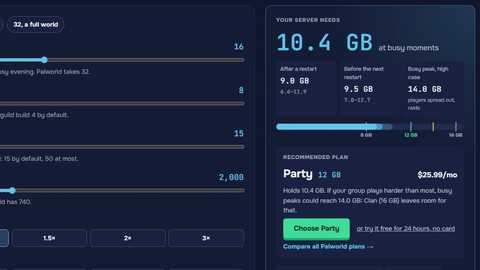
Settings, defaults and limits for Palworld 1.0.5. Memory estimates use our server requirements model. A WorldOption.sav is read with ooz-wasm (GPL-3.0-or-later) and written in the layout of one Palworld 1.0.5 saved.