Palworld settings checker
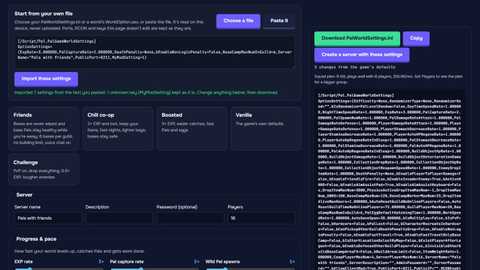
Step-by-step guideWhy aren’t my Palworld server settings working? Paste your PalWorldSettings.ini or choose your server’s folder: the checker finds what Palworld 1.0.5 would ignore, explains how to fix each problem and gives you a fixed file. Everything runs in your browser; nothing is uploaded.
What the checker looks for
- OptionSettings on several linesPalworld reads only the first line, so everything after a line break is ignored.
- A missing or misspelled section nameWithout [/Script/Pal.PalGameWorldSettings] above it, nothing in the file counts.
- The file in the wrong placeDefaultPalWorldSettings.ini, the game’s own Config/Windows folder, a .ini.txt name.
- Brackets and quotes that don’t closeOne missing ) or " swallows every setting after it. Curly “ ” quotes too.
- Misspelled and outdated keysEvery name is checked against the 122 keys of Palworld 1.0.5, with the closest real one suggested. AllowConnectPlatform became CrossplayPlatforms.
- Wrong types and rangesTrue/False switches, decimal commas, unknown platforms, technology IDs, the 32-player and 50-Pals-per-base limits.
- A WorldOption.sav that overrides the fileChoose the world folder and we read the .sav on your device and list every setting it changes.
- Settings that need each otherPvP needs three flags; fast travel, randomizer and voice options that do nothing alone; the same admin and join password.
- GotchasBase Pals that suffer while friends are offline, Global Palbox imports off by default, edits lost because the server was running.
What WorldOption.sav changes
The server uses the right-hand column, not your .ini.
| Setting | Your .ini | WorldOption.sav |
|---|
What’s fine
Your file, fixed
Where PalWorldSettings.ini goes
Windows server (SteamCMD or Steam’s Palworld Dedicated Server)
PalServer\Pal\Saved\Config\WindowsServer\PalWorldSettings.iniLinux server
PalServer/Pal/Saved/Config/LinuxServer/PalWorldSettings.iniNever read
DefaultPalWorldSettings.ini (a template), Config/Windows andConfig/WinGDK (the game you play, not the server).
Overrides it all
Pal/Saved/SaveGames/0/<world id>/WorldOption.sav, when it exists.
Stop the server before you edit: Palworld writes its own settings back to the file when it stops. Then start it again. To build a new file from scratch, use thePalworld server settings generator.
Quick answers
Why don’t my Palworld server settings work?
Most often one of these: OptionSettings is split over several lines (Palworld reads only the first), the file is in the wrong folder or named PalWorldSettings.ini.txt, a key is misspelled, or the world folder has a WorldOption.sav, which Palworld obeys instead of PalWorldSettings.ini. Palworld also writes its settings back to the file when it stops, so edits made while the server runs are lost. The checker above finds each of these.
Where does PalWorldSettings.ini go?
Windows server: PalServer\Pal\Saved\Config\WindowsServer\PalWorldSettings.ini. Linux server: PalServer/Pal/Saved/Config/LinuxServer/PalWorldSettings.ini. The folder appears after the server’s first start. DefaultPalWorldSettings.ini in the main folder is only a template: Palworld never reads it.
What is WorldOption.sav and should I delete it?
It stores a world’s settings. Co-op worlds and some Windows servers have one, and while it’s in the world folder (Pal/Saved/SaveGames/0/<world id>/) a dedicated server takes its settings from it instead of PalWorldSettings.ini. Stop the server, move it out of the folder (keep a copy), and start it again. Want to keep its rules? Load it in the settings generator to turn it into a PalWorldSettings.ini first.
Is my file uploaded anywhere?
No. The file, the folder and any WorldOption.sav are read by your browser on your device. When you choose a folder, your browser may say “upload”; nothing leaves your computer, and only the .ini files and WorldOption.sav are opened.
Why is PvP not working on my Palworld server?
bIsPvP=True alone isn’t enough. PvP requires three flags: bIsPvP, bEnablePlayerToPlayerDamage and bEnableDefenseOtherGuildPlayer, all True. The checker flags a mismatch and its fixed file sets all three.
What is the maximum number of players on a Palworld server?
32. ServerPlayerMaxNum above 32 doesn’t add slots, and the checker sets it back to 32 in the fixed file.
More free Palworld tools
Keys, defaults and limits for Palworld 1.0.5. WorldOption.sav is read with ooz-wasm (GPL-3.0-or-later).